notifications
News
box
Products
keyboard_arrow_down
For Enterprises
⇧1
Embeddings
World-class multimodal multilingual embeddings.
Reranker
World-class neural retriever for maximizing search relevancy.
Reader
Read URLs and search web for better grounding LLMs.
Classifier
Zero-shot and few-shot classification for image and text.
Segmenter
Cut long text into chunks and do tokenization.

For Power Users
PromptPerfect
Premier tool for prompt engineering
More power user tools
keyboard_arrow_down
SceneXplain
Leading AI solution for image captions and video summaries
BestBanner
Blog to banner, without the prompts!
JinaChat
More modality, longer memory, less cost
Rationale
Ultimate AI decision-making tools


Company
keyboard_arrow_down
About us
Contact sales
Intern program
Join us
open_in_new
Download logo
open_in_new
Terms & Conditions


Classifier

High performance zero-shot and few-shot classifier for multimodal and multilingual data.

What is Classifier?

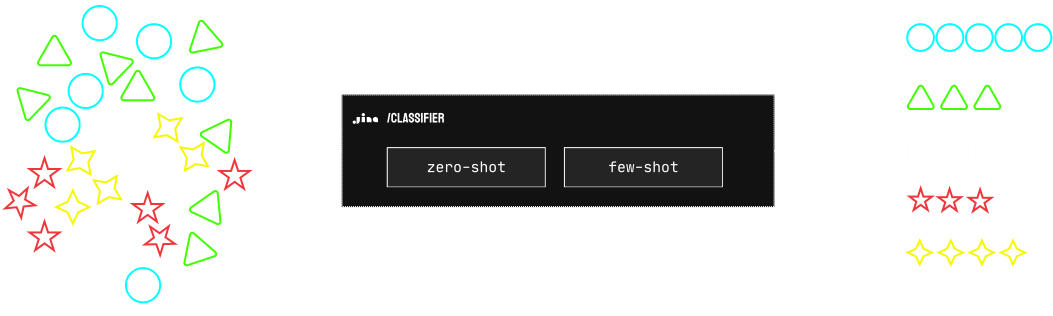
The Classifier is an API service that categorizes text and images using embedding models (jina-embeddings-v3 and jina-clip-v1), supporting both zero-shot classification without training data and few-shot learning with minimal examples.
Read release notesarrow_forward

When to use zero-shot or few-shot?

Use zero-shot classification as your default solution for immediate results on general classification tasks with up to 256 classes, while few-shot learning is better suited when dealing with domain-specific data outside the embedding models' knowledge or when you need to handle time-sensitive data that requires continuous model updates.
FeatureZero-shotFew-shot
Primary Use CaseDefault solution for general classificationFor data outside v3/clip-v1's domain or time-sensitive data
Multimodal & Multilingual Supportcheckcheck
Training Data Requiredclosecheck
Labels Required in /trainN/Acheck
Labels Required in /classifycheckclose
Classifier ID Requiredclosecheck
Semantic Labels Requiredcheckclose
State ManagementStatelessStateful
Continuous Model Updatesclosecheck
Access Controlclosecheck
Maximum Classes25616
Maximum ClassifiersN/A16
Maximum Inputs per Request1,0241,024
Maximum Token Length per Input8192 tokens8192 tokens

Classifier API

Try out our API playground to see how our classifier works.
report_problemWe cannot generate an API key because we couldn't verify if you are human. If you believe this is an error, please contact us.
Contact
key
API Key & Billing
code
Usage
more_horiz
More
chevron_leftchevron_right

home
Auto preview
help_outlineFAQ
api
Status
chevron_leftchevron_right


Inputs to classify
For text, it can be a sentence up to 8192 tokens. For images, it can be a URL or a base64-encoded image.

upload
Request
curl https://api.jina.ai/v1/classify \
  -H "Content-Type: application/json" \
  -H "Authorization: Bearer " \
  -d @- <<EOFEOF
  {
    "input": [
        "Calculate the compound interest on a principal of $10,000 invested for 5 years at an annual rate of 5%, compounded quarterly.",
        "分析使用CRISPR基因编辑技术在人类胚胎中的伦理影响。考虑潜在的医疗益处和长期社会后果。",
        "AIが自意識を持つディストピアの未来を舞台にした短編小説を書いてください。人間とAIの関係や意識の本質をテーマに探求してください。",
        "Erklären Sie die Unterschiede zwischen Merge-Sort und Quicksort-Algorithmen in Bezug auf Zeitkomplexität, Platzkomplexität und Leistung in der Praxis.",
        "Write a poem about the beauty of nature and its healing power on the human soul.",
        "Translate the following sentence into French: The quick brown fox jumps over the lazy dog."
    ],
    "labels": [
        "Simple task",
        "Complex reasoning",
        "Creative writing",
        "Complex reasoning",
        "Creative writing",
        "Simple task"
    ],
    "model": "jina-embeddings-v3",
    "action": "list"
  }
EOFEOF


API Pricing

API pricing is based on token usage - input tokens for standard APIs and output tokens for Reader API. One API key gives you access to all search foundation products.

With Jina Search Foundation API
The easiest way to access all of our products. Top-up tokens as you go.
Auto-recharge when tokens are low
Recommended for uninterrupted service in production. When your token balance is below the threshold you set, we will automatically recharge your credit card for the same amount as your last top-up. If you purchased multiple packs in the last top-up, we will recharge only one pack.
check
Understand the rate limit
Rate limits are the maximum number of requests that can be made to an API within a minute per IP address (RPM). Find out more about the rate limits for each product and tier below.
keyboard_arrow_down
Rate Limit
Rate limits are tracked in two ways: RPM (requests per minute) and TPM (tokens per minute). Limits are enforced per IP and can be reached based on whichever threshold—RPM or TPM—is hit first.
ProductAPI EndpointDescriptionarrow_upwardw/o API Keyw/ API Keyw/ Premium API KeyAverage LatencyToken Usage CountingAllowed Request
Embedding APIhttps://api.jina.ai/v1/embeddingsConvert text/images to fixed-length vectorsblock500 RPM & 1,000,000 TPM2,000 RPM & 5,000,000 TPM
bolt
depends on the input size
help
Count the number of tokens in the input request.POST
Reranker APIhttps://api.jina.ai/v1/rerankTokenize and segment long textblock500 RPM & 1,000,000 TPM2,000 RPM & 5,000,000 TPM
bolt
depends on the input size
help
Count the number of tokens in the input request.POST
Reader APIhttps://r.jina.aiConvert URL to LLM-friendly text20 RPM200 RPM1000 RPM4.6sCount the number of tokens in the output response.GET/POST
Reader APIhttps://s.jina.aiSearch the web and convert results to LLM-friendly textblock40 RPM100 RPM8.7sCount the number of tokens in the output response.GET/POST
Reader APIhttps://g.jina.aiGrounding a statement with web knowledgeblock10 RPM30 RPM22.7sCount the total number of tokens in the whole process.GET/POST
Classifier API (Zero-shot)https://api.jina.ai/v1/classifyClassify inputs using zero-shot classificationblock200 RPM & 500,000 TPM1,000 RPM & 3,000,000 TPM
bolt
depends on the input size
Tokens counted as: input_tokens + label_tokensPOST
Classifier API (Few-shot)https://api.jina.ai/v1/classifyClassify inputs using a trained few-shot classifierblock20 RPM & 200,000 TPM60 RPM & 1,000,000 TPM
bolt
depends on the input size
Tokens counted as: input_tokensPOST
Classifier APIhttps://api.jina.ai/v1/trainTrain a classifier using labeled examplesblock20 RPM & 200,000 TPM60 RPM & 1,000,000 TPM
bolt
depends on the input size
Tokens counted as: input_tokens × num_itersPOST
Segmenter APIhttps://segment.jina.aiTokenize and segment long text20 RPM200 RPM1,000 RPM0.3sToken is not counted as usage.GET/POST
Top up this API key with more tokens
Depending on your location, you may be charged in USD, EUR, or other currencies. Taxes may apply.
Please input the right API key to top up

FAQ

How to get my API key?

video_not_supported

What's the rate limit?

Rate Limit
Rate limits are tracked in two ways: RPM (requests per minute) and TPM (tokens per minute). Limits are enforced per IP and can be reached based on whichever threshold—RPM or TPM—is hit first.
ProductAPI EndpointDescriptionarrow_upwardw/o API Keyw/ API Keyw/ Premium API KeyAverage LatencyToken Usage CountingAllowed Request
Embedding APIhttps://api.jina.ai/v1/embeddingsConvert text/images to fixed-length vectorsblock500 RPM & 1,000,000 TPM2,000 RPM & 5,000,000 TPM
bolt
depends on the input size
help
Count the number of tokens in the input request.POST
Reranker APIhttps://api.jina.ai/v1/rerankTokenize and segment long textblock500 RPM & 1,000,000 TPM2,000 RPM & 5,000,000 TPM
bolt
depends on the input size
help
Count the number of tokens in the input request.POST
Reader APIhttps://r.jina.aiConvert URL to LLM-friendly text20 RPM200 RPM1000 RPM4.6sCount the number of tokens in the output response.GET/POST
Reader APIhttps://s.jina.aiSearch the web and convert results to LLM-friendly textblock40 RPM100 RPM8.7sCount the number of tokens in the output response.GET/POST
Reader APIhttps://g.jina.aiGrounding a statement with web knowledgeblock10 RPM30 RPM22.7sCount the total number of tokens in the whole process.GET/POST
Classifier API (Zero-shot)https://api.jina.ai/v1/classifyClassify inputs using zero-shot classificationblock200 RPM & 500,000 TPM1,000 RPM & 3,000,000 TPM
bolt
depends on the input size
Tokens counted as: input_tokens + label_tokensPOST
Classifier API (Few-shot)https://api.jina.ai/v1/classifyClassify inputs using a trained few-shot classifierblock20 RPM & 200,000 TPM60 RPM & 1,000,000 TPM
bolt
depends on the input size
Tokens counted as: input_tokensPOST
Classifier APIhttps://api.jina.ai/v1/trainTrain a classifier using labeled examplesblock20 RPM & 200,000 TPM60 RPM & 1,000,000 TPM
bolt
depends on the input size
Tokens counted as: input_tokens × num_itersPOST
Segmenter APIhttps://segment.jina.aiTokenize and segment long text20 RPM200 RPM1,000 RPM0.3sToken is not counted as usage.GET/POST

Other questions

Classifier-related common questions
What's different about labels in zero-shot vs few-shot?
keyboard_arrow_down
Zero-shot requires semantic labels during classification and none during training, while few-shot requires labels during training but not classification. This means zero-shot is better for flexible, immediate classification needs, while few-shot is better for fixed, domain-specific categories that can evolve over time.
What's num_iters for and how should I use it?
keyboard_arrow_down
num_iters controls training intensity - higher values reinforce important examples while lower values minimize impact of less reliable data. It can be used to implement time-aware learning by giving recent examples higher iteration counts, making it valuable for evolving data patterns.
How does public classifier sharing work?
keyboard_arrow_down
Public classifiers can be used by anyone with the classifier_id, consuming their own token quota. Users can't access training data or configuration, and can't see others' classification requests, enabling safe classifier sharing.
How much data do I need for few-shot to work well?
keyboard_arrow_down
Few-shot requires 200-400 training examples to outperform zero-shot classification. While it ultimately achieves higher accuracy, it needs this warm-up period to become effective. Zero-shot provides consistent performance immediately without training data.
Can it handle multiple languages and both text/images?
keyboard_arrow_down
Yes - the API supports multilingual queries using jina-embeddings-v3 and multimodal (text/image) classification using jina-clip-v1, with support for URL or base64 encoded images in the same request.
What are the hard limits I should know about?
keyboard_arrow_down
Zero-shot supports 256 classes with no classifier limit, while few-shot is limited to 16 classes and 16 classifiers. Both support 1,024 inputs per request and 8,192 tokens per input.
How do I handle data changes over time?
keyboard_arrow_down
Few-shot mode allows continuous updating through the /train endpoint for adapting to changing data patterns. You can incrementally add new examples or classes when data distribution changes, without rebuilding the entire classifier.
What happens to my training data after I send it?
keyboard_arrow_down
The API uses one-pass online learning - training examples update classifier weights but aren't stored afterward. This means you can't retrieve historical training data, but it ensures privacy and resource efficiency.
Zero-shot vs few-shot - when to use which?
keyboard_arrow_down
Start with zero-shot for immediate results and when you need flexible classification with semantic labels. Switch to few-shot when you have 200-400 examples, need higher accuracy, or need to handle domain-specific/time-sensitive data.
Can I use different models for different languages/tasks?
keyboard_arrow_down
Yes, you can choose between jina-embeddings-v3 for text classification (especially good for multilingual) and jina-clip-v1 for multimodal classification. New models like jina-clip-v2 will be automatically available through the API when released.
API-related common questions
code
Can I use the same API key for embedding, reranking, reader, fine-tuning APIs?
keyboard_arrow_down
Yes, the same API key is valid for all search foundation products from Jina AI. This includes the embedding, reranking, reader and fine-tuning APIs, with tokens shared between the all services.
code
Can I monitor the token usage of my API key?
keyboard_arrow_down
Yes, token usage can be monitored in the 'Buy tokens' tab by entering your API key, allowing you to view the usage history and remaining tokens.
code
What should I do if I forget my API key?
keyboard_arrow_down
If you have misplaced a topped-up key and wish to retrieve it, please contact support AT jina.ai with your registered email for assistance.
Contact
code
Do API keys expire?
keyboard_arrow_down
No, our API keys do not have an expiration date. However, if you suspect your key has been compromised and wish to retire it or transfer its tokens to a new key, please contact our support team for assistance.
Contact
code
Why is the first request for some models slow?
keyboard_arrow_down
This is because our serverless architecture offloads certain models during periods of low usage. The initial request activates or 'warms up' the model, which may take a few seconds. After this initial activation, subsequent requests process much more quickly.
code
Is user input data used for training your models?
keyboard_arrow_down
We adhere to a strict privacy policy and do not use user input data for training our models.
Billing-related common questions
attach_money
Is billing based on the number of sentences or requests?
keyboard_arrow_down
Our pricing model is based on the total number of tokens processed, allowing users the flexibility to allocate these tokens across any number of sentences, offering a cost-effective solution for diverse text analysis requirements.
attach_money
Is there a free trial available for new users?
keyboard_arrow_down
We offer a welcoming free trial to new users, which includes one million tokens for use with any of our models, facilitated by an auto-generated API key. Once the free token limit is reached, users can easily purchase additional tokens for their API keys via the 'Buy tokens' tab.
attach_money
Are tokens charged for failed requests?
keyboard_arrow_down
No, tokens are not deducted for failed requests.
attach_money
What payment methods are accepted?
keyboard_arrow_down
Payments are processed through Stripe, supporting a variety of payment methods including credit cards, Google Pay, and PayPal for your convenience.
attach_money
Is invoicing available for token purchases?
keyboard_arrow_down

Yes, an invoice will be issued to the email address associated with your Stripe account upon the purchase of tokens.
Offices
location_on
Berlin, Germany (HQ)
Prinzessinnenstraße 19-20, 10969 Berlin, Germany
location_on
Beijing, China
Level 5, Building 6, No.48 Haidian West St. Beijing Haidian, China
location_on
Shenzhen, China
402, Floor 4, Fu'an Technology Building, Shenzhen Nanshan, China
Search Foundation
Embeddings
Reranker
Reader
Classifier
Segmenter
Get Jina AI API key
Rate Limit
API Status
Company
About us
Contact sales
Newsroom
Intern program
Join us
open_in_new
Download logo
open_in_new
Terms
Commercial License
Security
Terms & Conditions
Privacy
Manage Cookies
email
Jina AI GmbH © 2020-2024.